快速入门:DreamZero模型训练#
本文档介绍如何在 LoongForge 框架下快速启动 DreamZero 训练,包括权重与数据准备、Full / LoRA 训练、续训以及可选的 Feature Cache。支持 Wan2.2-TI2V-5B 和 Wan2.1-I2V-14B 两种模型规格,命令默认从 LoongForge 仓库根目录执行,示例使用 /workspace/LoongForge,请按实际环境替换。
0. 资源准备#
0.1 环境变量#
cd /workspace/LoongForge
export LOONGFORGE_PATH=$(pwd)
export DREAMZERO_CKPT_ROOT=/workspace/dreamzero/checkpoints
export DREAMZERO_DATA_ROOT=/workspace/dreamzero/data
export DREAMZERO_CACHE_ROOT=/workspace/dreamzero/cache

export WAN21_CKPT_DIR=$DREAMZERO_CKPT_ROOT/Wan2.1-I2V-14B-480P
export WAN22_CKPT_DIR=$DREAMZERO_CKPT_ROOT/Wan2.2-TI2V-5B
export DREAMZERO_AGIBOT_CKPT_DIR=$DREAMZERO_CKPT_ROOT/DreamZero-AgiBot

mkdir -p "$DREAMZERO_CKPT_ROOT" "$DREAMZERO_DATA_ROOT" "$DREAMZERO_CACHE_ROOT"
环境变量 |
含义 |
|---|---|
|
LoongForge 仓库根目录,用于从任意目录定位训练脚本和配置 |
|
DreamZero 相关权重的统一存放目录 |
|
各训练数据集的统一存放目录 |
|
离线 Feature Cache 的统一输出目录;不使用 cache 时不会影响在线训练 |
|
Wan2.1-I2V-14B 权重目录,同时为 5B 训练提供 CLIP 图像编码器 |
|
Wan2.2-TI2V-5B 权重目录 |
|
AgiBot / YAM LoRA 训练使用的初始化权重目录;DROID 和 LIBERO 不需要 |
上述路径均可按实际存储位置调整。训练脚本会读取对应变量,不要求使用示例中的目录结构。
0.2 下载权重#
场景 |
必需权重 |
|---|---|
Wan2.2 5B DROID / LIBERO |
完整 Wan2.2 5B;Wan2.1 中的 CLIP image encoder |
Wan2.1 14B DROID |
完整 Wan2.1 14B |
Wan2.1 14B AgiBot / YAM LoRA |
完整 Wan2.1 14B;DreamZero-AgiBot 初始化权重 |
python -m pip install -U "huggingface_hub[cli]"

# Wan backbone
hf download Wan-AI/Wan2.1-I2V-14B-480P --local-dir "$WAN21_CKPT_DIR"
hf download Wan-AI/Wan2.2-TI2V-5B --local-dir "$WAN22_CKPT_DIR"

# 只训练 5B 时,Wan2.1 只需补充 CLIP(Wan2.2 仓库不含 CLIP,5B 仍用它编码首帧)
hf download Wan-AI/Wan2.1-I2V-14B-480P \
    models_clip_open-clip-xlm-roberta-large-vit-huge-14.pth \
    --local-dir "$WAN21_CKPT_DIR"

# AgiBot / YAM LoRA 初始化权重(DROID、LIBERO 不需要)
hf download GEAR-Dreams/DreamZero-AgiBot \
    --repo-type model --local-dir "$DREAMZERO_AGIBOT_CKPT_DIR"
Tokenizer 默认使用 Wan 仓库自带的 $WAN22_CKPT_DIR/google/umt5-xxl(5B)/ $WAN21_CKPT_DIR/google/umt5-xxl(14B),无需单独下载。若需要独立共享目录:
export TOKENIZER_PATH=$DREAMZERO_CKPT_ROOT/umt5-xxl
hf download google/umt5-xxl \
    special_tokens_map.json spiece.model tokenizer.json tokenizer_config.json \
    --local-dir "$TOKENIZER_PATH"
0.3 权重完整性检查#
test -f "$WAN22_CKPT_DIR/diffusion_pytorch_model.safetensors.index.json"
test -f "$WAN22_CKPT_DIR/models_t5_umt5-xxl-enc-bf16.pth"
test -f "$WAN22_CKPT_DIR/Wan2.2_VAE.pth"
test -f "$WAN21_CKPT_DIR/models_clip_open-clip-xlm-roberta-large-vit-huge-14.pth"
test -f "$WAN22_CKPT_DIR/google/umt5-xxl/spiece.model"

# 训练 14B 时再检查:
test -f "$WAN21_CKPT_DIR/diffusion_pytorch_model.safetensors.index.json"
test -f "$WAN21_CKPT_DIR/models_t5_umt5-xxl-enc-bf16.pth"
test -f "$WAN21_CKPT_DIR/Wan2.1_VAE.pth"
echo "DreamZero weight check passed"
0.4 下载数据集#
# DROID(约 131GB,已转换为 LeRobot v2)
export DROID_DATA_ROOT=$DREAMZERO_DATA_ROOT/droid_lerobot
hf download GEAR-Dreams/DreamZero-DROID-Data \
    --repo-type dataset --local-dir "$DROID_DATA_ROOT"

# LIBERO(用于仿真场景训练)
export LIBERO_DATA_ROOT=$DREAMZERO_DATA_ROOT/libero_lerobot
hf download physical-intelligence/libero \
    --repo-type dataset --local-dir "$LIBERO_DATA_ROOT"
AgiBot / YAM 暂无可直接使用的 LeRobot v2 训练数据,需按下节字段约定完成转换。
1. 数据配置#
1.1 输入格式#
dataset_root/
├── data/**/episode_*.parquet
├── videos/                         # info.json 中使用 video dtype 时必需
└── meta/
    ├── info.json                   # codebase_version 须以 v2 开头
    ├── tasks.jsonl
    └── episodes.jsonl
|
State / Action |
视频字段 |
语言或任务字段 |
|---|---|---|---|
|
|
|
三个 |
|
|
|
|
|
|
|
|
|
packed |
top/left/right 三个 |
|
完整字段以 tools/data_preprocess/embodied/dreamzero/prepare_dataset.py 中的 PRESETS 为准。
1.2 生成 DreamZero metadata#
EMBODIMENT_TAG=oxe_droid DATA_PATH="$DROID_DATA_ROOT" \
    bash examples/embodied/dreamzero/prepare_dreamzero_dataset.sh

EMBODIMENT_TAG=libero_sim DATA_PATH="$LIBERO_DATA_ROOT" \
    bash examples/embodied/dreamzero/prepare_dreamzero_dataset.sh

EMBODIMENT_TAG=agibot DATA_PATH=/path/to/agibot_lerobot \
    bash examples/embodied/dreamzero/prepare_dreamzero_dataset.sh

EMBODIMENT_TAG=yam DATA_PATH=/path/to/yam_lerobot \
    bash examples/embodied/dreamzero/prepare_dreamzero_dataset.sh
常用选项:
FORCE=1:覆盖已有 metadataSKIP_STATISTICS=1:只生成 schema、跳过统计量;开始完整训练前仍需补齐统计量
处理成功后会输出 DreamZero dataset preparation complete。
2. 启动训练#
2.1 Full / LoRA 训练#
cd "$LOONGFORGE_PATH"
export DATA_PATH=$DROID_DATA_ROOT
export WANDB_MODE=disabled

# 5B Full,默认 200000 步
bash examples/embodied/dreamzero/run_dreamzero_wan22_5b_full_finetune.sh

# 5B LoRA
TRAIN_ITERS=10000 SAVE_INTERVAL=1000 \
    bash examples/embodied/dreamzero/run_dreamzero_wan22_5b_lora_finetune.sh

# 14B Full
bash examples/embodied/dreamzero/run_dreamzero_wan21_14b_full_finetune.sh

# 14B LoRA,DROID
TRAIN_ITERS=10000 SAVE_INTERVAL=1000 \
    bash examples/embodied/dreamzero/run_dreamzero_wan21_14b_lora_finetune.sh

# LIBERO 5B Full
MODEL_NAME=dreamzero_libero_wan22_5b DATA_PATH="$LIBERO_DATA_ROOT" \
    bash examples/embodied/dreamzero/run_dreamzero_wan22_5b_full_finetune.sh

# AgiBot / YAM 14B LoRA(从 DreamZero-AgiBot 初始化)
MODEL_NAME=dreamzero_agibot_wan21_14b DATA_PATH=/path/to/agibot_lerobot \
    bash examples/embodied/dreamzero/run_dreamzero_wan21_14b_lora_finetune.sh

MODEL_NAME=dreamzero_yam_wan21_14b DATA_PATH=/path/to/yam_lerobot \
    bash examples/embodied/dreamzero/run_dreamzero_wan21_14b_lora_finetune.sh
DROID 场景无需设置 MODEL_NAME,训练脚本会自动选择对应配置;仅切换到 LIBERO、AgiBot 或 YAM 时需要按示例覆盖。
默认配置:
场景 |
分布式策略 |
每卡 batch |
默认 global batch |
默认 LR |
|---|---|---|---|---|
5B Full |
8 卡 DDP + ZeRO-1 |
1 |
8 |
|
5B LoRA |
8 卡 FSDP |
1 |
8 |
|
14B Full |
8 卡 FSDP |
1 |
8 |
|
14B DROID LoRA |
8 卡 FSDP |
1 |
8 |
|
14B AgiBot / YAM LoRA |
8 卡 FSDP |
1 |
8 |
|
可通过 PER_DEVICE_BATCH_SIZE 和 GLOBAL_BATCH_SIZE 调整批量大小,但需满足 GLOBAL_BATCH_SIZE % (GPUS_PER_NODE * NNODES * PER_DEVICE_BATCH_SIZE) == 0。机器不足 8 卡时可设置 GPUS_PER_NODE,默认 global batch size 会随之变化。
2.2 续训#
TRAIN_ITERS=20000 SAVE_INTERVAL=1000 \
OUTPUT_DIR=/workspace/outputs/dreamzero/droid_wan22_5b_lora \
    bash examples/embodied/dreamzero/run_dreamzero_wan22_5b_lora_finetune.sh \
    --resume
--resume 会从 $OUTPUT_DIR/checkpoints 加载最新 checkpoint。续训时须保持与保存时相同的 world size 和 batch 配置;未找到 checkpoint 时会直接报错。
2.3 离线 Feature Cache(可选)#
# 生成完整 cache(5B 默认 video_latents + prompt_embs;14B 默认不含 prompt_embs)
MODEL_NAME=dreamzero_full_wan22_5b DATA_PATH="$DROID_DATA_ROOT" \
CACHE_OUTPUT_DIR=$DREAMZERO_CACHE_ROOT/dreamzero_full_wan22_5b \
GPUS_PER_NODE=8 SAMPLE_TRANSFORM_SEED=0 VALIDATION_REQUIRE_FULL_COVERAGE=1 \
    bash examples/embodied/dreamzero/precompute_dreamzero_cache.sh

# 使用 cache 训练(须与生成时 SAMPLE_TRANSFORM_SEED、分辨率、语言 chunk 配置一致)
CACHE_DIR=$DREAMZERO_CACHE_ROOT/dreamzero_full_wan22_5b SAMPLE_TRANSFORM_SEED=0 \
    bash examples/embodied/dreamzero/run_dreamzero_wan22_5b_full_finetune.sh
训练脚本会在启动阶段严格校验 cache。manifest、_SUCCESS 或 transform 配置不匹配时,训练会在执行首步前终止。
2.4 性能优化开关#
DROID 5B / 14B 配置已启用经过验证的默认性能优化。LIBERO、AgiBot 和 YAM 默认采用保守配置;调整性能开关后,建议先运行 3~10 步,检查 loss、grad norm 和显存占用。
对照组(关闭全部内核优化,用于定位 loss / 性能问题):
# Wan2.2 5B
bash examples/embodied/dreamzero/run_dreamzero_wan22_5b_full_finetune.sh \
    model.flash_attention_dense=false model.avoid_rope_reconcat=false \
    model.batch_vae_encode=false 'model.prompt_emb_cache=""'

# Wan2.1 14B
bash examples/embodied/dreamzero/run_dreamzero_wan21_14b_full_finetune.sh \
    model.skip_single_state_attention=false model.compile_causal_cross_attention=false \
    model.compile_cross_attention_emulate_precision_casts=false model.compile_block_norm_modulate=false \
    model.qk_rmsnorm_impl=wan model.manual_self_attn_linear_backward=false model.fused_rope=false \
    'model.prompt_emb_cache=""' model.cache_fa_lens=false model.cache_fa_lens_clone=false
空字符串须写成带引号的 'model.prompt_emb_cache=""'。
主要开关:
开关 |
默认值 |
作用 |
|---|---|---|
|
|
dense attention 直接用 FlashAttention |
|
|
复用分段 RoPE 结果,减少临时张量 |
|
|
批量 VAE 编码,吞吐更高但显存峰值更大,OOM 时关闭 |
|
|
缓存冻结 Text Encoder 输出,可设 |
|
|
|
|
|
融合 RoPE kernel |
|
|
缓存 FlashAttention cumulative sequence lengths |
2.5 正确性验证#
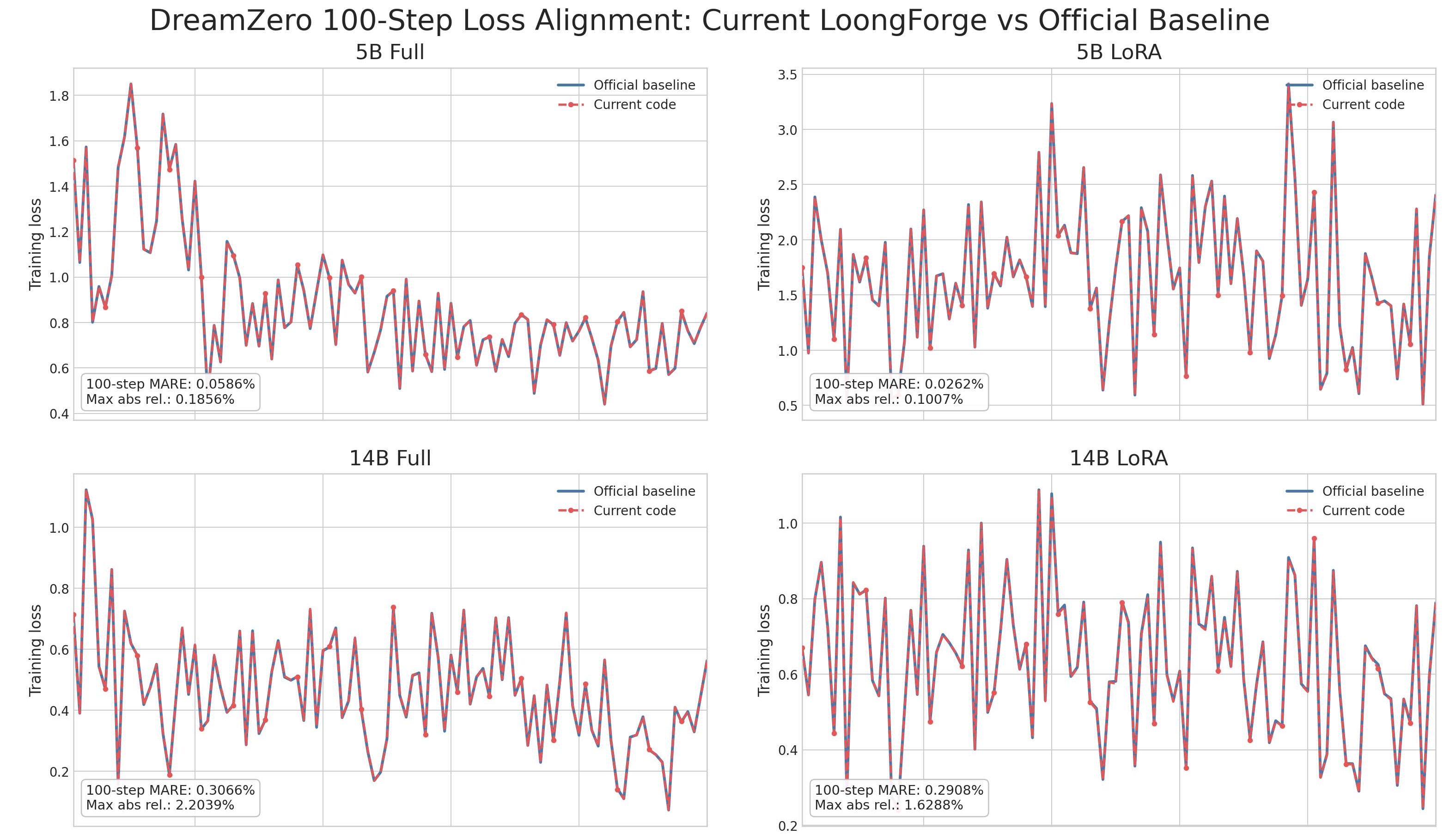
为保证训练精度不受优化手段影响,我们在相同数据、权重和训练配置下,对 LoongForge 适配的 DreamZero 与官方实现进行了逐 step 的 loss 对比验证。结果表明,LoongForge 的各项性能优化对训练精度无损: