Quick Start: GR00T N1.7 Training#
This guide walks you through launching a GR00T N1.7 SFT training job in the LoongForge framework.
0. Resource Preparation#
0.1 Model Weights#
The GR00T-N1.7 main weights are specified by CHECKPOINT_PATH and loaded via --pretrained-checkpoint. The default path in the script is /workspace/huggingface.co/GR00T-N1.7-3B:
hf download nvidia/GR00T-N1.7-3B --local-dir /workspace/huggingface.co/GR00T-N1.7-3B
If the HuggingFace repository requires authentication, log in first:
huggingface-cli login
0.2 Qwen3-VL / Cosmos Backbone#
GR00T-N1.7 uses Cosmos-Reason2-2B as its backbone. The script points to a local backbone via COSMOS_LOCAL_PATH and defaults TOKENIZER_PATH to the same location:
hf download nvidia/Cosmos-Reason2-2B --local-dir /workspace/huggingface.co/nvidia/Cosmos-Reason2-2B
Note: COSMOS_LOCAL_PATH is not the GR00T-N1.7 main weight path. It is responsible for loading the Qwen3-VL backbone, processor/tokenizer, and related config files locally.
0.3 Dataset#
The script uses the officially preprocessed LeRobot v2.1 sample dataset cube_to_bowl_5 by default. To train with custom data, follow NVIDIA Isaac-GR00T to complete offline data preprocessing and convert raw data into LeRobot v2.1 format before training.
export DATA_PATH=/workspace/cube_to_bowl_5
The dataset arguments used by the training entrypoint are:
--dataset-format lerobot_datasets
--dataset-strategy groot_n1_7
--lerobotdataset-version v2.1
--video-backend torchcodec
The data directory must contain LeRobot metadata and video/image fields. If meta/modality.json, meta/stats.json, and meta/relative_stats.json exist in the directory, the N1.7 data strategy will read them automatically at training time to parse modality information and normalization statistics.
1. Data Configuration#
The following steps are performed online during training:
LeRobot episode/step sampling;
GR00T-N1.7 sample transform;
Qwen3-VL text and image batch collation;
state/action normalization, padding, and action mask construction.
The default data configuration is:
data:
  embodiment_tag: libero_sim
  groot_preprocess_mode: sharded
  max_token_len: null
  preprocess_action_horizon: null
  state_dropout_prob: 0.2
  exclude_state: false
  use_mean_std: false
  use_percentiles: true
  clip_outliers: true
  apply_sincos_state_encoding: false
  use_relative_action: true
  image_crop_size: [230, 230]
  image_target_size: [256, 256]
  random_rotation_angle: 0
  formalize_language: true
  shard_size: 1024
  episode_sampling_rate: 0.1
  num_shards_per_epoch: 100000
If you are training a custom embodiment, override the tag at the end of the launch command:
bash examples/embodied/groot_n1_7/run_groot_n1_7_ddp_finetune.sh data.embodiment_tag=new_embodiment
2. Launch Training#
First, set the paths consistently:
cd /workspace/LoongForge

export LOONGFORGE_PATH=/workspace/LoongForge/
export CHECKPOINT_PATH=/workspace/huggingface.co/GR00T-N1.7-3B
export COSMOS_LOCAL_PATH=/workspace/huggingface.co/nvidia/Cosmos-Reason2-2B/
export TOKENIZER_PATH=$COSMOS_LOCAL_PATH
export DATA_PATH=/workspace/cube_to_bowl_5
export OUTPUT_DIR=/workspace/outputs/groot_n1_7
export TENSORBOARD_PATH=/workspace/tensorboard-log/groot_n1_7
2.1 Verify the Training Pipeline#
Start with a minimal configuration to validate data loading, weight loading, DDP communication, and the forward/backward pipeline. This mode disables all performance optimizations and uses the standard AdamW:
bash /workspace/LoongForge/examples/embodied/groot_n1_7/run_groot_n1_7_ddp_finetune.sh \
    --optimizer AdamW \
    --cuda-graph-impl none \
    --cuda-graph-pad-length 0 \
    --no-ddp-static-graph \
    --train-iters 10
2.2 Default Training Configuration#
The script enables the following optimizations by default and can be run directly:
bash /workspace/LoongForge/examples/embodied/groot_n1_7/run_groot_n1_7_ddp_finetune.sh
Optimizations enabled by default include:
TEFusedAdamW — a fused optimizer that reduces kernel-launch overhead during the optimizer step;
CUDA Graph —
per_microbatchmode, which captures a CUDA Graph for each microbatch to reduce host-side scheduling overhead;DDP Static Graph — enables DDP static graph mode, which is used together with CUDA Graph.
To disable a specific optimization, override the corresponding argument at the end of the command. For example, to fall back to plain AdamW:
--optimizer AdamW
Or to disable CUDA Graph:
--cuda-graph-impl none
Additional notes on CUDA Graph:
--cuda-graph-pad-length 0means the token length is not forced to a fixed value; actual padding followsmax_token_lenfrom the data configuration or dynamic batch padding;To fix the text length and improve graph reuse, set a non-zero
--cuda-graph-pad-length.
2.3 Correctness Verification#
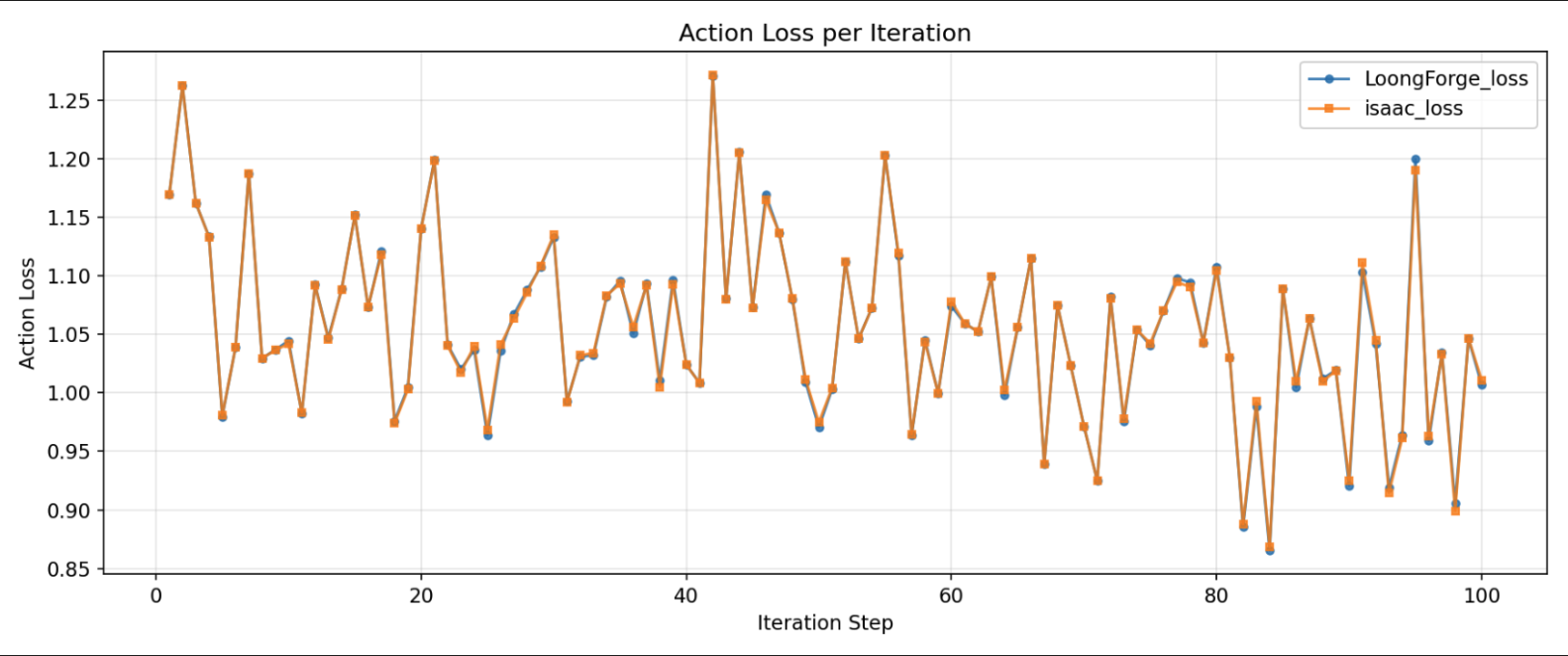
To ensure training accuracy is not affected by the optimization techniques, we performed a step-by-step action loss comparison between LoongForge’s GR00T-N1.7 implementation and the official one, using identical data, weights, and training configurations. The results show that LoongForge’s performance optimizations (TEFusedAdamW, CUDA Graph, DDP static graph, etc.) preserve training accuracy: