Quick Start: X-VLA Training#
This document introduces how to quickly launch X-VLA SFT (Supervised Fine-Tuning) training in the LoongForge framework.
0. Resource Preparation#
0.1 Model Weights#
The X-VLA main weights (Florence2 vision-language backbone + SoftPromptedTransformer action head) are specified by CHECKPOINT_PATH and loaded via --pretrained-checkpoint. It supports raw HuggingFace safetensors weights. Taking the officially released X-VLA-WidowX fine-tuned weights as an example, download them to a local directory:
# Place the officially released X-VLA-WidowX checkpoint into this directory
hf download 2toINF/X-VLA-WidowX --local-dir /workspace/ckpt/X-VLA-WidowX
0.2 Tokenizer / Processor#
X-VLA reuses Florence2’s tokenizer / image processor, colocated in the same checkpoint directory as the main weights. It is specified by TOKENIZER_PATH and loaded via --tokenizer-path:
export TOKENIZER_PATH=/workspace/ckpt/X-VLA-WidowX
0.3 Dataset#
X-VLA uses an episode-level HDF5 dataset (HDF5VLADataset). The dataset is organized via a metadata.json descriptor file, and DATA_PATH points to the directory containing this file together with the episode_*.hdf5 files:
hf download 2toINF/X-VLA-SoftFold --repo-type dataset --local-dir /workspace/data/X-VLA-SoftFold
1. Data Configuration#
X-VLA uses the native HDF5 data pipeline aligned with the reference implementation, with no extra offline preprocessing required. X-VLA’s per-sample transform (multi-view image encoding, language tokenization, resolving domain_id from robot_type) and batch collator are performed online during training.
The dataset directory is described by metadata.json. Example (examples/embodied/xvla/xvla_soft_fold/metadata.json):
{
  "dataset_name": "AIR-AGILEX",
  "robot_type": "AIR-AGILEX",
  "datalist": [
    "/mnt/cfs/pxy/data/XVLA-Soft-Fold/0928_10am_new/episode_0.hdf5",
    "/mnt/cfs/pxy/data/XVLA-Soft-Fold/0928_10am_new/episode_1.hdf5"
  ],
  "observation_key": [
    "observations/images/cam_high",
    "observations/images/cam_left_wrist",
    "observations/images/cam_right_wrist"
  ],
  "language_instruction_key": "language_instruction"
}
Field descriptions:
dataset_name/robot_type: Dataset name and embodiment type.robot_typedeterminesdomain_id(which selects the per-domain soft prompt of SoftPromptedTransformer and the DomainAwareLinear weights), and must match the value used when training the checkpoint.datalist: absolute path list of episode HDF5 files; when omitted, auto-discovered underDATA_PATHasepisode_*.hdf5.observation_key: keys of multi-view images in HDF5; order defines the view order (the first is the primary view).language_instruction_key: language instruction field name.
2. Launch Training#
First set up the paths uniformly (refer to examples/embodied/xvla/run_xvla_ddp_finetune.sh):
cd /workspace/LoongForge

export LOONGFORGE_PATH=/workspace/LoongForge
export TOKENIZER_PATH=/workspace/ckpt/X-VLA-WidowX
export CHECKPOINT_PATH=/workspace/ckpt/X-VLA-WidowX
export DATA_PATH=/workspace/data/X-VLA-SoftFold/0928_10am_new/
export OUTPUT_DIR=/workspace/outputs/xvla_ddp
2.1 Launch Script#
Single-node 8-GPU DDP fine-tuning:
bash examples/embodied/xvla/run_xvla_ddp_finetune.sh
Optimizations are enabled by default, in configs/models/embodied/xvla.yaml:
enable_torch_compile: true
2.2 Key Arguments#
The main arguments in the script are grouped as follows.
Model and Distributed:
--model-name xvla                    # Mapped to XVLA config via config_map
--distributed-strategy ddp           # DDP distributed strategy
--dtype bfloat16                     # Training precision
# GPUS_PER_NODE=8                    # Number of GPUs per node (script variable)
Data:
--dataset-format hdf5_datasets       # Use the native HDF5 dataset
--dataset-path $DATA_PATH            # Directory containing metadata.json
--tokenizer-path $TOKENIZER_PATH     # Florence2 tokenizer / processor directory
--robot-type libero_franka           # Embodiment type identifier
--num-workers 2                      # Number of DataLoader workers
Training:
--trainer-type FinetuneTrainer
--train-iters 40
--gradient-accumulation-steps 1
--lr-base 1e-4                       # Base learning rate
--lr-group "model.vlm=1e-5,model.transformer.soft_prompt_hub=1e-5"  # Grouped learning rates: VLM backbone and soft prompt use smaller lr
--lr-warmup-iters 5
--optimizer AdamW
--clip-grad 1.0
--weight-decay 0.0
--adam-beta1 0.9
--adam-beta2 0.95
--adam-eps 1e-8
--pretrained-checkpoint $CHECKPOINT_PATH   # Pretrained weights
--save-interval 100                  # Checkpoint save interval
--seed 42
Note: The
robot_typeinmetadata.jsondetermines thedomain_idused for training/inference. Make sure it matches the embodiment of the loaded checkpoint; otherwise it will select the wrong per-domain soft prompt / linear weights.
2.3 Correctness Verification#
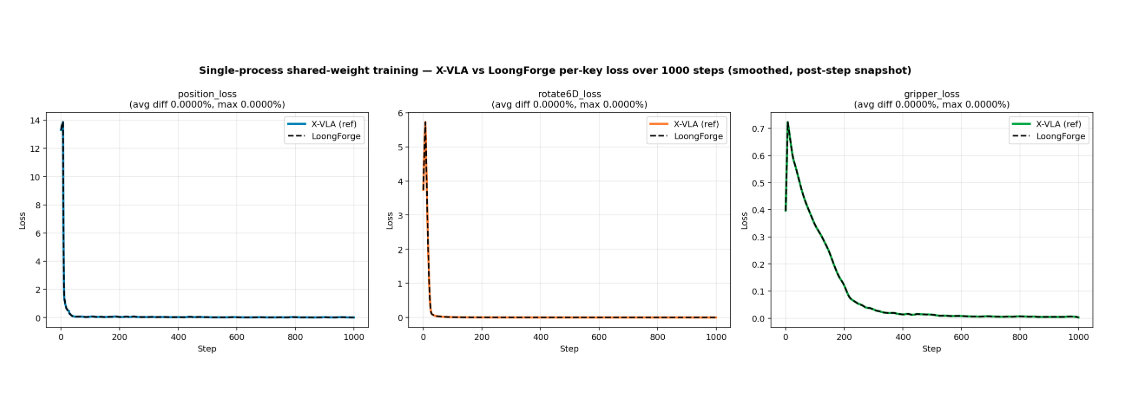
To ensure training accuracy is not affected by optimizations, under the same data, weights and training config, we performed step-by-step loss comparison between LoongForge’s X-VLA and the reference implementation. Results show that LoongForge’s performance optimizations do not affect training accuracy: